
Your own account
Your installation is separate from every other family’s. You invite people using their email addresses.
Open source · MIT licensed
Keep everyone’s gift ideas in one place. See who’s buying what, without spoiling the surprise.
Family Wishlist is a public, open-source project—not a hosted wishlist service. Fork the code, run it in your own Cloudflare account and adapt it for your family.
Source, documentation, tests and issue tracking are public.

MIT licensedPublic source & documentationSelf-hosted on CloudflareNo ads, tracking or subscription
The open-source project
There is no central Family Wishlist account to sign up for and no hosted product being sold here. The complete application lives in a public repository, together with its installation guide, architecture, tests, roadmap and security record.
Use it under the MIT licence, follow its development, report a problem or propose an improvement.

JonReed/cloudflare-family-wishlistStart with the README for the project overview, or go straight to the source and documentation.
Inside Family Wishlist
Everyone has a wishlist. Add a product link, a size or a note, and mark the ideas you’d most like. Family members can also add ideas to each other’s lists.
When you decide to buy something, choose “I’ll get this”. Other family members can see your choice. The person receiving the gift won’t see who is buying it.


Screenshots from the app, using fictional names and gift ideas.
Ask for a homemade cake, a day out or help in the garden. A wish only needs a name; a shop link is optional.
Explore the featuresExample gift ideas
“The one you keep telling me about.”
A second-hand copy would be lovely.“A pottery class together.”
Tea afterwards?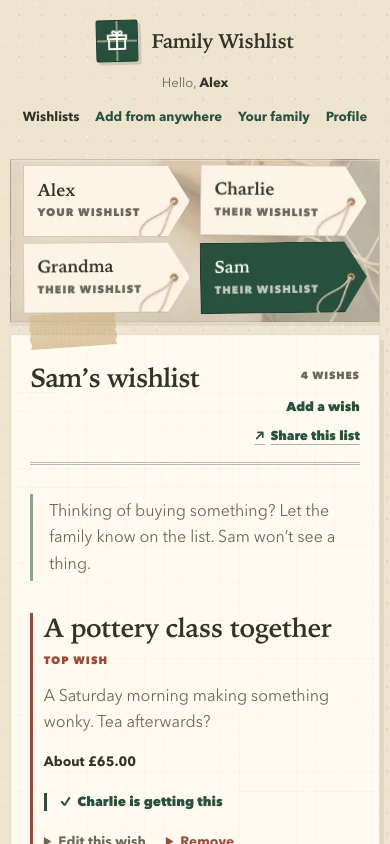
On your phone or computer
After a short setup, send a shop link from your phone’s Share menu or a bookmark in your desktop browser. Check the details and choose a list before saving.
Ways to add a wishThe app and its database run in your Cloudflare account. You decide who can sign in and look after your own installation.
How privacy worksYour installation is separate from every other family’s. You invite people using their email addresses.
The app has no advertising or analytics scripts and does not add affiliate codes to shop links.
The complete app is available under the MIT licence. You can read the code, use it for free and make your own changes.
The project publishes AI-assisted security reviews, including OpenAI Daybreak Blue. The maintained record explains what was checked, any findings and fixes, and the exact code reviewed.
Read about the security reviewStart with the project
Everything needed to evaluate Family Wishlist is available before you install it.
Answers about hosting, sharing and keeping gifts a surprise.
Yes. The app is free under the MIT licence. Normal family use is designed to fit within Cloudflare’s free plans, which include a web address. You can pay for your own domain or help with installation if you want to. Cloudflare’s usage limits still apply. Read about the free-plan limits.
Yes. Paste a product link from any shop, or add an idea without a link. The app can fill in a name, picture and price in pounds when it can read the product page. You can check or change every detail before saving, and fill them in yourself if the lookup does not work.
No. When you look at your own list, you won’t see who is buying anything or whether it has been bought. The rest of the family can see that information to help avoid buying the same gift.
No. Everyone can use the wishlist in a web browser and sign in with a code sent to their email. There are optional shortcuts for adding shop links from your phone or computer.
One person needs to set up the app using GitHub, Cloudflare and a few command-line tools. The public installation guide explains the steps. After setup, family members just open the wishlist in their browser.
Yes. Send them a viewing link for one person’s list. Anyone with the link can see the ideas, but cannot edit the list or see who is buying what. You can stop a link from working at any time.
Open source, end to end
Read the code, fork the repository and run it in your own Cloudflare account.
